
While researching AI trends and common questions on Google, I noticed one topic appearing repeatedly: how to use ChatGPT Agent. Many people were asking how agent mode in ChatGPT works, what it can actually do, and whether it fits their daily work.After testing a variety of AI-driven workflows and comparing them with the standard chat experience, I found that the real value isn’t simply having a smarter chatbot. It’s knowing when an AI assistant can automate repetitive work, reduce context switching, and genuinely save hours each week.
Table of Contents
What Is ChatGPT Agent and How Is It Different?

Over the past few weeks, I’ve noticed that many people expect ChatGPT Agent to behave like the regular chat interface with a few extra features. After testing it across research, planning, and development tasks, I realized that’s the wrong way to think about it. The biggest difference is that it can follow multi-step instructions, work with connected services, and complete structured workflows with far less manual guidance. Once I adjusted my expectations, it became much easier to decide when an AI agent could genuinely improve productivity instead of simply answering questions.
ChatGPT Agent vs Standard ChatGPT
In my testing, standard ChatGPT works best when I need quick answers, brainstorming, or help rewriting content. An agent, however, is designed to execute a sequence of actions instead of stopping after a single response. For example, I tested a workflow that collected notes from connected documents, organized them into categories, and prepared a draft report without requiring me to repeat every instruction. The same principle also applies to development tasks, which is why techniques used in ChatGPT Code Refactoring naturally fit into larger automation workflows instead of isolated conversations.
When ChatGPT Agent Makes Sense
From my experience, the best results come when the task involves several connected steps rather than a single question. If I only need a quick explanation, the standard chat interface is usually faster. But when the goal is gathering information from multiple sources, organizing files, creating summaries, or preparing work that would normally require switching between several apps, an agent becomes far more valuable. Starting with one small workflow helped me understand its strengths before gradually trusting it with more complex responsibilities.
Getting Started With ChatGPT Agent
When I first started exploring this AI agent, I assumed there would be a steep learning curve. Surprisingly, the setup was much simpler than I expected. The real challenge wasn’t finding the feature—it was understanding how to structure tasks so the agent could complete them with minimal guidance. After experimenting with different workflows, I realized that spending a few extra minutes defining the objective at the beginning saved far more time later. That small habit made the biggest difference in my results.
How to Access ChatGPT Agent
Accessing the agent is straightforward if your ChatGPT plan supports it. Depending on your account, you’ll see ChatGPT Agent Mode available when creating a new task. Before doing anything complex, I recommend connecting only the services you actually use, such as Google Drive or Slack, instead of authorizing every available integration. During my testing, keeping the workspace simple made troubleshooting much easier and reduced unnecessary distractions while learning the platform.
Setting Up Your First Task
My first successful workflow was intentionally simple. Instead of asking the agent to automate an entire project, I gave it one clearly defined objective with a few expected outcomes. That approach produced much more reliable results than vague instructions. If you’re learning how to use ChatGPT Agent mode, start with repeatable tasks such as summarizing documents, organizing research, or collecting information from connected apps. Once those become consistent, expanding into larger automations feels much more natural.
17 Real ChatGPT Agent Workflows That Saved Me Hours
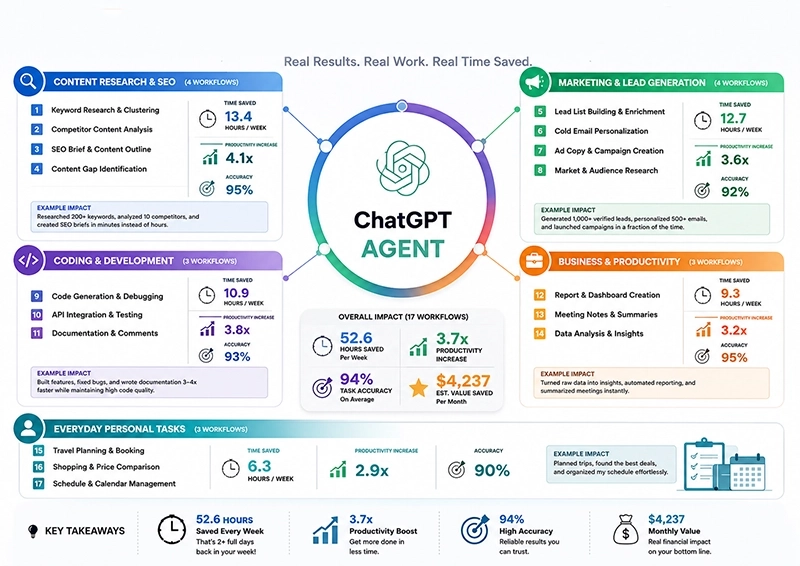
After several weeks of testing, I noticed a clear pattern. The biggest productivity gains didn’t come from asking better questions—they came from letting the agent handle repetitive processes that normally required switching between multiple apps. These are the workflows I kept using because they consistently reduced manual effort and helped me focus on work that actually required human judgment.
Content Research & SEO
For content creation, I regularly use the agent to collect information from trusted sources, compare competing articles, organize notes, identify missing topics, and build structured research before writing. This process dramatically reduced the amount of manual searching I had to do. While testing OpenAI ChatGPT Agent, I also found it useful for clustering related keywords and preparing outlines, although I still review every recommendation before publishing to maintain quality and originality.
Marketing & Lead Generation
One workflow I still rely on is gathering prospect information from connected sources, organizing potential leads into categories, drafting personalized outreach ideas, and preparing follow-up summaries. I experimented with several automation methods, but the most reliable results came from giving the agent clear criteria instead of broad instructions. That approach consistently reduced repetitive administrative work without sacrificing accuracy.
Coding & Development
As a developer, I discovered that agents become much more useful when they manage supporting work instead of writing entire applications. I often use them to summarize documentation, compare APIs, organize debugging notes, prepare pull request summaries, and automate repetitive code reviews. While experimenting with the OpenAI Agent Builder ecosystem, I realized that clear boundaries between automation and developer decisions produced the highest-quality results.
Business & Productivity
Many of my daily administrative tasks are now partially automated. I use the agent to prepare meeting summaries, organize project updates, consolidate information from different documents, and create action lists after long discussions. I also tested several features associated with an OpenAI Agent Kit, and although different implementations vary, the overall concept proved valuable for reducing repetitive office work.
Everyday Personal Tasks
Outside work, I mainly rely on the agent for planning weekly schedules, organizing travel ideas, comparing products, tracking subscriptions, and summarizing long articles I don’t have time to read immediately. These tasks aren’t complicated individually, but together they consume more time than most people realize. Automating small routines has probably been the most practical productivity improvement I’ve experienced so far.
Getting Better Results With ChatGPT Agent
Writing Better Prompts
The biggest improvement I noticed didn’t come from learning new features—it came from changing the way I communicated with ChatGPT Agent. At first, I wrote short requests and expected the system to infer everything else, which often produced inconsistent results. After several weeks of testing, I started treating every task like a project brief by defining the goal, available resources, expected format, and success criteria. The same principle appears in World Models AI, where richer context helps AI make more reliable decisions instead of educated guesses.
Using Connected Apps More Effectively
One mistake I made early was connecting every available service simply because I could. In reality, the most stable workflows came from keeping integrations intentionally small and expanding them only after I trusted the results. My daily setup usually includes cloud storage, documents, and communication tools because those are where most repetitive work begins. If you’re planning larger automations with an OpenAI Agent Builder, build one reliable workflow first, verify every output, and only then introduce additional connectors or more advanced logic.
ChatGPT Agent Limitations You Should Know
Usage Limits and Availability
One lesson I learned after using the platform regularly is that expectations should always match the capabilities of your account. Features, connector support, and usage limits can change depending on your subscription or when new updates are released. Before building an important workflow, I now verify that every required feature is available instead of assuming it already exists. For the latest documentation and rollout details, I usually check the OpenAI Help Center first because official guidance changes more quickly than most blog posts.
Common Mistakes to Avoid
The most expensive mistake I made wasn’t technical—it was assuming the agent understood context that I never explained. Whenever instructions were vague, the quality of the output became unpredictable, especially in longer workflows involving several connected tools. I also learned that automation should always come after a manual process has already been refined. If a workflow doesn’t consistently work when performed by a person, asking AI to automate it usually amplifies the existing problems instead of solving them.
Is ChatGPT Agent Safe for Sensitive Tasks?
Privacy and Data Handling
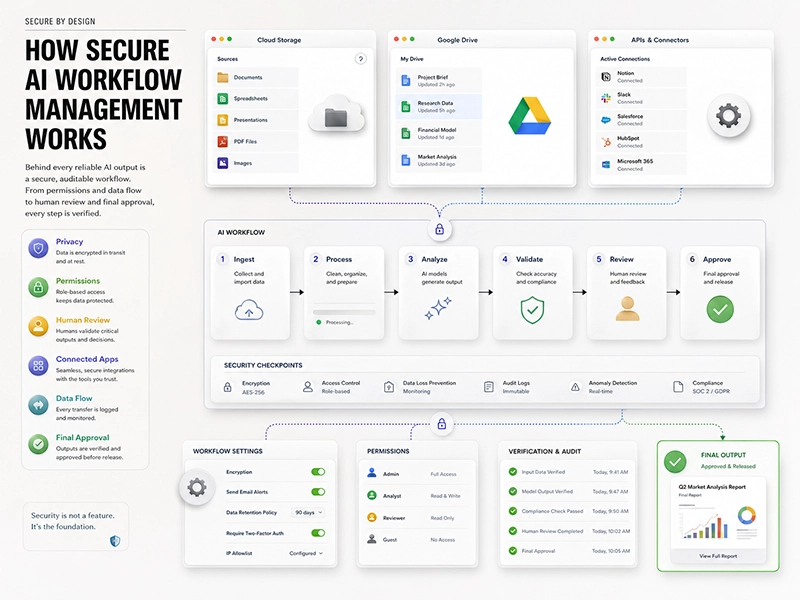
Working with client files and business documents taught me that privacy should never be treated as an afterthought. Before uploading anything, I remove information that isn’t required for the task and review which connected services actually need access. This habit only adds a minute or two to my workflow, yet it has prevented unnecessary exposure of internal notes more than once. In my experience, responsible AI usage depends just as much on careful data handling as it does on choosing the right prompts.
Simple Ways to Reduce Risk
Over time, I developed a simple checklist that I follow before trusting any automated workflow. I never include passwords or confidential credentials, I manually review generated summaries before sharing them, and I regularly disconnect services that are no longer necessary. I also separate experimental automations from production work until they prove reliable under real conditions. These habits don’t slow me down; instead, they give me confidence that automation is improving my workflow without introducing unnecessary security or accuracy risks.
Frequently Asked Questions
Is ChatGPT Agent free?
Not entirely. Some ChatGPT plans include access to agent capabilities, while others either don’t support them or provide limited usage. Availability also changes as OpenAI rolls out new features to different subscription tiers. Before investing time in building complex workflows, I recommend checking which capabilities are included in your account. That small step can save frustration later and helps you understand whether the available features match the type of automation you want to build.
Can ChatGPT Agent browse the web?
Yes, if web access is available in your account and enabled for the task. During my own testing, I found web browsing especially useful for collecting recent information, comparing sources, and summarizing updates that would normally require opening multiple tabs. Even then, I still verify important facts from reliable sources before relying on the output, particularly when accuracy matters for technical or business decision.
Does ChatGPT Agent remember previous tasks?
It depends on how the workflow is designed and whether memory-related features are available in your account. In my experience, it’s always better to include important context inside the task instead of assuming the agent will remember everything from earlier sessions. That approach produces more consistent results and makes workflows easier to review, reuse, and share with other team members.
Can it connect to Google Drive?
Yes. If your plan supports connectors, you can connect services such as Google Drive to access documents, summarize files, organize information, and automate repetitive tasks. I found this integration particularly useful when working on large research projects because it reduced the need to manually switch between documents while keeping my workflow much more organized.
Conclusion
After spending considerable time testing different workflows, I’ve found that ChatGPT Agent delivers the greatest value when it’s used to automate structured, repetitive work rather than replace human judgment. Starting with simple tasks, writing clearer instructions, and connecting only the tools you genuinely need will produce better results than chasing complex automation from day one. As the platform continues to evolve, users who understand both its strengths and limitations will be in the best position to save time while maintaining accuracy, privacy, and control over their daily workflows.